---
title: Comment créer une référence ?
description: Dans cette vidéo, vous allez apprendre à créer une ou plusieurs nouvelles références dans Spacefill.
---
[Passer au contenu](https://help.spacefill.eu/knowledge/comment-créer-une-référence#main-content)
Français
Afficher le sous-menu pour les traductions
-1.png?width=100&height=28&name=spacefill_full_logo_green%20(1)-1.png)
Ouvrir la navigation principale
Fermer la navigation principale
- Français
Afficher le sous-menu pour les traductions
Centre d'aide Spacefill
- Il n'y a aucune suggestion car le champ de recherche est vide.
1. [Help Center](https://help.spacefill.eu/knowledge?hsLang=fr)
2. [Références (Base article)](https://help.spacefill.eu/knowledge/r%C3%A9f%C3%A9rences-base-article?hsLang=fr)
# Comment créer une référence ?
## Dans cette vidéo, vous allez apprendre à créer une ou plusieurs nouvelles références dans Spacefill.
### Étape par Étape : Créer une nouvelle référence
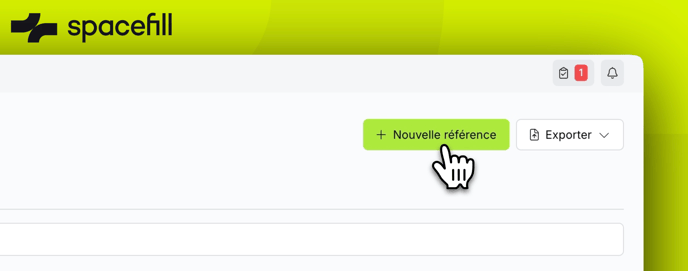
1. **Accéder à l'outil de création**
- Rendez-vous dans l'onglet "Références".
- Cliquez sur le bouton **"Nouvelle référence"** situé en haut à droite de l'écran.
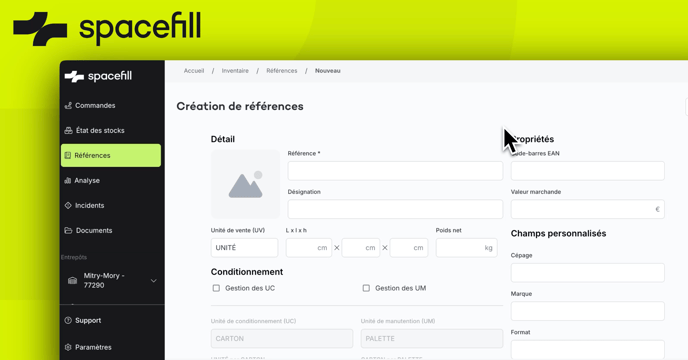
2. **Remplir le formulaire de création**
- Une fois le formulaire ouvert, renseignez les informations suivantes :
- **Référence** : le code ou identifiant unique de votre produit.
- **Désignation** : le nom ou la description de votre produit.
- **Dimensions** : longueur, largeur, hauteur.
- **Poids** : poids unitaire du produit.
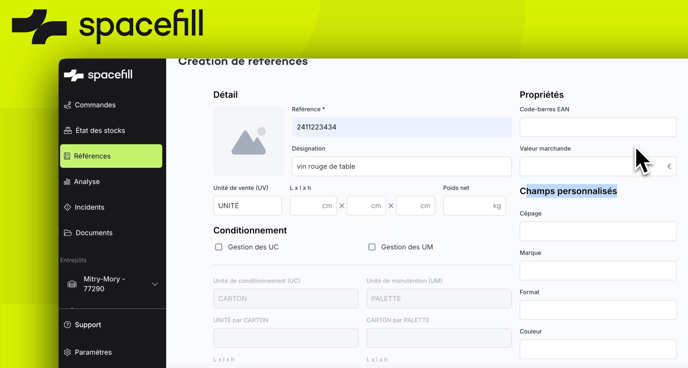
3. **Ajouter des champs personnalisés (optionnel)**
- Si nécessaire, complétez les **champs personnalisés** pour inclure des informations spécifiques à votre fonctionnement.
*(Insérer un screenshot montrant où ajouter les champs personnalisés)*
4. **Créer plusieurs références en une seule fois**
- Cliquez sur le bouton **"Importer"**.
*(Insérer un screenshot du bouton "Importer" à l'écran)*
- Téléchargez le **modèle Excel** proposé.
*(Insérer un screenshot de l'étape pour télécharger le modèle)*
- Remplissez le modèle avec les informations des produits à ajouter.
- Importez le fichier rempli en le téléversant via l'interface.
5. **Valider la création**
- Une fois les informations complétées (individuellement ou via un import), vérifiez-les puis validez.
**Félicitations ! Vous savez désormais créer une ou plusieurs références pour vos produits.**
- [Vous êtes un logisticien](https://help.spacefill.eu/knowledge/vous-%C3%AAtes-un-logisticien?hsLang=fr#main-content)
- [Gérer ses stocks](https://help.spacefill.eu/knowledge/vous-%C3%AAtes-un-logisticien?hsLang=fr#g%C3%A9rer-ses-stocks)
- [Gérer sa facturation](https://help.spacefill.eu/knowledge/vous-%C3%AAtes-un-logisticien?hsLang=fr#g%C3%A9rer-sa-facturation)
- [Gérer la configuration de mon espace](https://help.spacefill.eu/knowledge/vous-%C3%AAtes-un-logisticien?hsLang=fr#g%C3%A9rer-la-configuration-de-mon-espace)
- [Gérer les problèmes remontés par mes clients](https://help.spacefill.eu/knowledge/vous-%C3%AAtes-un-logisticien?hsLang=fr#g%C3%A9rer-les-probl%C3%A8mes-remont%C3%A9s-par-mes-clients)
- [Configuration & paramétrage](https://help.spacefill.eu/knowledge/configuration-param%C3%A9trage?hsLang=fr#main-content)
- [Utilisateurs & collaborateurs](https://help.spacefill.eu/knowledge/configuration-param%C3%A9trage?hsLang=fr#utilisateurs-collaborateurs)
- [Configurer l'interface Spacefill](https://help.spacefill.eu/knowledge/configuration-param%C3%A9trage?hsLang=fr#configurer-linterface-spacefill)
- [Commandes (Expéditions & Réceptions)](https://help.spacefill.eu/knowledge/commandes-exp%C3%A9ditions-r%C3%A9ceptions?hsLang=fr)
- [Références (Base article)](https://help.spacefill.eu/knowledge/r%C3%A9f%C3%A9rences-base-article?hsLang=fr)
- [État des stocks](https://help.spacefill.eu/knowledge/%C3%A9tat-des-stocks?hsLang=fr)
- [Incidents](https://help.spacefill.eu/knowledge/incidents?hsLang=fr)
- [Documents](https://help.spacefill.eu/knowledge/documents?hsLang=fr)
- [Intégrations & API](https://help.spacefill.eu/knowledge/int%C3%A9grations-api?hsLang=fr#main-content)
- [Tout savoir sur les intégrations](https://help.spacefill.eu/knowledge/int%C3%A9grations-api?hsLang=fr#tout-savoir-sur-les-int%C3%A9grations)
- [Connecter Prestashop](https://help.spacefill.eu/knowledge/int%C3%A9grations-api?hsLang=fr#connecter-prestashop)
- [Connecter Shopify](https://help.spacefill.eu/knowledge/int%C3%A9grations-api?hsLang=fr#connecter-shopify)
- [Connecter Gorgias](https://help.spacefill.eu/knowledge/int%C3%A9grations-api?hsLang=fr#connecter-gorgias)
- [Configuration de votre espace](https://help.spacefill.eu/knowledge/configuration-de-votre-espace?hsLang=fr)
- [Orders (Inbound & Outbound)](https://help.spacefill.eu/knowledge/orders-inbound-outbound?hsLang=fr)
- [References](https://help.spacefill.eu/knowledge/references?hsLang=fr)
- [Settings & configuration](https://help.spacefill.eu/knowledge/settings-configuration?hsLang=fr)
- [Transport & Dock scheduling](https://help.spacefill.eu/knowledge/transport-dock-scheduling?hsLang=fr)
- [Automations](https://help.spacefill.eu/knowledge/automations?hsLang=fr)
- [Transport & Rendez-vous à quai](https://help.spacefill.eu/knowledge/transport-rendez-vous-%C3%A0-quai?hsLang=fr)
- [Automatisations](https://help.spacefill.eu/knowledge/automatisations?hsLang=fr)
- [Contact us](https://lp.spacefill.fr/fr-fr/contact-form)
[](http://spacefill.eu)
[mailto:email@email.com](mailto:email@email.com)
Copyright © 2025, Spacefill
```json
{
"@context" : "https://schema.org",
"@type" : "VideoObject",
"contentUrl" : "https://stream.mux.com/Ho1kMmzil8Ux7Efx7gRI6tROLMrhi006uRAZTWnH4GLE/capped-1080p.mp4",
"dateModified" : "2025-01-28T13:21:51.263Z",
"duration" : "PT1M15S",
"height" : 2160,
"name" : "Référence - Comment créer une référence",
"thumbnailUrl" : "https://7501784.fs1.hubspotusercontent-na1.net/hubfs/7501784/Knowledge%20Base%20Import/R%C3%A9f%C3%A9rence%20-%20Comment%20cr%C3%A9er%20une%20r%C3%A9f%C3%A9rence.mp4/medium.jpg",
"uploadDate" : "2025-01-28T13:21:51.257Z",
"width" : 3824
}
```